👋 Allow us to reintroduce ourselves! Salesforce Anywhere is now Quip.
Learn how Quip for Sales accelerates growth with revenue planning for the #1 CRM: sfdc.co/hellofromquip
Quip (software)
Quip is a collaborative productivity software suite for mobile and the Web. It allows groups of people to create and edit documents and spreadsheets as a group, typically for business purposes. More on Wikipedia
-
Quip reposted
Salesforce Quip
@SalesforceQuip

-
QuipSupport
@QuipSupport
RT @QuipSupport: Thank you Bob! Our support team has sent you updates via tickets #43664 and #43666.
-
QuipSupport
@QuipSupport
Our Engineering team has resolved the doc creation issue from this morning -reach out to support@quip.com with any additional questions
-
QuipSupport
@QuipSupport
We are currently troubleshooting a known issue with creating new Quip documents--we will send updates on our progress here
-
Post not available here, view on X
QuipSupport
@QuipSupport
Very sorry for our delay-please check your email for an update.
-
Post not available here, view on X
QuipSupport
@QuipSupport
This is currently our Quip is meant to operate but please know that we've pushed this feedback directly to our PM team !
-
QuipSupport
@QuipSupport
Did you know you can seamlessly switch between your work and personal @quip accounts? Learn more here: help.salesforce.com/s/?language=en_US
-
QuipSupport
@QuipSupport
Curious about everything you can do with Quip spreadsheets? Check out this article for the low down: help.salesforce.com/s/?language=en_US
-
QuipSupport
@QuipSupport
Procrastinating on getting your work week started? Learn how to get work done in @quip : help.salesforce.com/s/?language=en_US
-
Post not available here, view on X
QuipSupport
@QuipSupport
Sorry! We have search modifiers that might help you find what you're looking for -- help.salesforce.com/s/?language=en_US
-
Post not available here, view on X
QuipSupport
@QuipSupport
Please e-mail support@quip.com and we can help troubleshoot ASAP.
-
QuipSupport
@QuipSupport
Our Engineering team has resolved all issues with login errors--please reach out to support@quip.com with any additional questions
-
QuipSupport
@QuipSupport
We are currently troubleshooting a known issue with logins--we will send updates on our progress here
-
Post not available here, view on X
QuipSupport
@QuipSupport
Thank you for the heads up-we'd be happy to help troubleshoot further if you e-mail support@quip.com!
-
Post not available here, view on X
QuipSupport
@QuipSupport
Congrats @getquip for more praise!
-
Post not available here, view on X
QuipSupport
@QuipSupport
👀 ⚒ whoops! stay tuned - that's a teaser of some cool stuff coming soon.
-
Post not available here, view on X
QuipSupport
@QuipSupport
We're so sorry--our intent is definitely not to be unnecessarily laborious! Let's talk more via email support@quip.com?
-
Post not available here, view on X
QuipSupport
@QuipSupport
So sorry to hear this is happening! Please e-mail support@quip.com so we can look into this right away!
-
QuipSupport
@QuipSupport
@walmsles@tpitigala On sign up you can import contacts, but we won't email them. If you experienced otherwise, please email support@quip.com
-
Post not available here, view on X
QuipSupport
@QuipSupport
Wow, sounds super frustrating-- sorry that's happening! Can you email us at support@quip.com and we'll take a look ASAP?
-
Post not available here, view on X
QuipSupport
@QuipSupport
You discovered our hidden debugging key! That's triggered by holding the "command" key while opening Quip.
-
QuipSupport
@QuipSupport
Our help center is affected by @Zendesk issues. For updates on their outage, visit status.zendesk.com. We'll get back to everyone ASAP.
-
Post not available here, view on X
QuipSupport
@QuipSupport
stay tuned - we have some surprises for you coming soon.
QuipSupport
@QuipSupport
we unfortunately don't do sponsorships currently - good idea and something we'll hopefully do eventually.
QuipSupport
@QuipSupport
follow the link to become an official viral marketer for Quip ;) get.swag.com/nfqxg/7465895068?page=error
-
Post not available here, view on X
QuipSupport
@QuipSupport
We haven't made any changes there, but it may be a bug. Can you share the details with support@Quip.com. We'll look deeper into it!
-
Post not available here, view on X
QuipSupport
@QuipSupport
Hi @gabylasala, thanks for reaching out. Please reach out via support@quip.com so our tech team can take a look at your account. Thanks
-
Post not available here, view on X
QuipSupport
@QuipSupport
You can just shoot an email to support@Quip.com and we'll sort it out! No need to create an account. Sorry for the confusion!
QuipSupport
@QuipSupport
got it. Shooting you an email now!
QuipSupport
@QuipSupport
Just shot you an email directly!
-
QuipSupport
@QuipSupport
Want to learn more about Quip? Check out quipsupport.com or request help at www.quipsupport.com/hc/en-us/requests/new
-
Post not available here, view on X
QuipSupport
@QuipSupport
Thanks for reporting! Normal method for selecting text should work. Mind emailing device info to support@quip.com?
-
Post not available here, view on X
QuipSupport
@QuipSupport
Appreciate the feedback! Keep it coming!
-
QuipSupport
@QuipSupport
No font sizes strictly speaking, but you are able to increase text size on desktop app or web via View->Zoom In (or Cmd+ keyboard shortcut)
-
Post not available here, view on X
QuipSupport
@QuipSupport
We'll be able to help with that - just shoot a note to support@quip.com.
-
Post not available here, view on X
QuipSupport
@QuipSupport
So sorry for the trouble! We'd love to hear more about the issues you're running into at support@quip.com!
-
Post not available here, view on X
QuipSupport
@QuipSupport
Currently not possible to expand, but you can use multiple words in the filename to narrow results. Hope this helps!
-
Post not available here, view on X
QuipSupport
@QuipSupport
We'd love to add but currently not possible. Thanks for letting us know you'd like to see this!
-
Post not available here, view on X
QuipSupport
@QuipSupport
If these are two separate linked accounts you will be able to, if accts were merged you will need to share docs to new acct.
QuipSupport
@QuipSupport
Please reach out to support@quip.com and we're happy to look into this further and advise the best option for you.
-
Post not available here, view on X
QuipSupport
@QuipSupport
This is the default behavior for shared documents. No way to disable currently. Appreciate the feedback!
-
Post not available here, view on X
QuipSupport
@QuipSupport
Appreciate the feedback! Here are instructions on how to highlight text in Quip - www.quipsupport.com/entries/57998359-How-do-I-highlight-a…
-
QuipSupport
@QuipSupport
Tweeting is our ❤️; but best places to get detailed support are www.quipsupport.com & support@quip.com.
-
Post not available here, view on X
QuipSupport
@QuipSupport
would love to hear your thoughts - send to feedback@quip.com.
-
Post not available here, view on X
QuipSupport
@QuipSupport
thanks for the report! we're investigating some wonky behavior with keyboards and iPad Pro at the moment.
-
Post not available here, view on X
QuipSupport
@QuipSupport
shoot us a note at support (at) quip.com.
-
Post not available here, view on X
QuipSupport
@QuipSupport
Hi @ricburton - Make sure you've invited quipbot to the channel using /quip first. Or ping Support@Quip.com for more help! Thanks.
-
Post not available here, view on X
QuipSupport
@QuipSupport
you should be able to accomplish with a formula. This may be easier to resolve in Quip- Would you mind writing into support@quip.com?
-
Post not available here, view on X
QuipSupport
@QuipSupport
possibly try a formula? Something like B1 = initial number, B2 = B1 + 1? Then you could drag down to create the incremental range?
-
Post not available here, view on X
QuipSupport
@QuipSupport
So happy you're into our revised spreadsheets. It's been a long time in the making...
QuipSupport
@QuipSupport
Thanks for the feedback on the titles - we'll definitely be improving spreadsheets so this is helpful to hear.
-
QuipSupport
@QuipSupport
If you've got questions about the new Quip Spreadsheets for Teams, the team's answering questions on Product Hunt: www.producthunt.com/tech/quip-spreadsheets-for-teams
-
Post not available here, view on X
QuipSupport
@QuipSupport
@aaronford We haven't noticed anything on our end. Are you still having issues?
QuipSupport
@QuipSupport
@aaronford Good to hear. Please let us know if you have any more issues.
-
Post not available here, view on X
QuipSupport
@QuipSupport
@WSig Thanks for the request -- we'd love to hear any other ideas/feedback at feedback@quip.com!
-
Post not available here, view on X
QuipSupport
@QuipSupport
@WSig That's frustrating, sorry! Can you please send what you're seeing to support@quip.com so we can troubleshoot? Thanks!
-
Post not available here, view on X
QuipSupport
@QuipSupport
@SimonSmailus When not in a list, you can indent by manually adding spaces
-
Post not available here, view on X
QuipSupport
@QuipSupport
@WSig Thanks for reporting this and sorry for the trouble -- mind emailing support@quip.com so we can dig in further with you? Thanks!
-
Post not available here, view on X
QuipSupport
@QuipSupport
@internetburrito You can @ mention folders in Quip docs now, yes! Just like you would mention people and docs
-
Post not available here, view on X
QuipSupport
@QuipSupport
@TwokRosemond Yes! It's not fully released yet, but send both email addresses to support@quip.com and we'll set you up!
-
Post not available here, view on X
QuipSupport
@QuipSupport
@dariru3 Sorry you are running into this issue. Email us at support@quip.com and we'll help you sort this out.
-
Post not available here, view on X
QuipSupport
@QuipSupport
@WilBeCoding Cut/paste will do the trick -- just be sure to grab one line above and below the spreadsheet in order to move the whole table!
-
Post not available here, view on X
QuipSupport
@QuipSupport
@prd Shoot us an email at support@quip.com and we can quickly take care of this for you!
-
Post not available here, view on X
QuipSupport
@QuipSupport
@iBrunoTome @quip Sorry for the trouble...can you send a screenshot to support@quip.com so we can take a look? Thanks!
-
Post not available here, view on X
QuipSupport
@QuipSupport
@_dmaux Thanks for the feedback! Keyboard shortcuts should work in OSX app. Command + / will bring up the full list.
-
Post not available here, view on X
QuipSupport
@QuipSupport
@_dmaux we don't have alignment just yet, but it's something we're working on. Thanks!
-
Post not available here, view on X
QuipSupport
@QuipSupport
@cbee Well that's not good -- so sorry! If you can submit details to support@quip.com we'll be happy to investigate and help resolve
-
Post not available here, view on X
QuipSupport
@QuipSupport
@ChrisDaether Not yet, but thanks for the feedback! We'd love to learn more about your use case at support@quip.com
-
Post not available here, view on X
QuipSupport
@QuipSupport
@cbee @quip We actually support split view already! It's available on iPad Air 2 and iPad Pro
-
Post not available here, view on X
QuipSupport
@QuipSupport
@ElSnarkistani We'd also be happy to help answer any questions: support@quip.com 😃
-
Post not available here, view on X
QuipSupport
@QuipSupport
@ElSnarkistani Great question. Unfortunately no drag/drop yet, so cut/paste is probably best!
-
Post not available here, view on X
QuipSupport
@QuipSupport
@chartier Thanks so much for the shout out 👍 -- please let us know if there is anything we can do to provide further support!
-
Post not available here, view on X
QuipSupport
@QuipSupport
@fjdekermadec Thanks so much for the feedback! Definitely room for improvement, and something we plan to update 😃
-
Post not available here, view on X
QuipSupport
@QuipSupport
@seltaire Thanks so much for the shout out! We'd love to hear more about what you'd like to see in Quip at feedback@quip.com 🆕📱💻
-
Post not available here, view on X
QuipSupport
@QuipSupport
@orcsbr Awesome to hear! Thanks again for the feedback 👍😃
-
Post not available here, view on X
QuipSupport
@QuipSupport
@orcsbr Thx for the question! Clipper functionality on our list. If you paste a link into doc message or chat, we do auto-append image today
-
Post not available here, view on X
QuipSupport
@QuipSupport
@jarsofclay72 We'd love to help! Please reach out to support@quip.com from email associated with account.
-
Post not available here, view on X
QuipSupport
@QuipSupport
@ChrisDaether Thanks for letting us know. We'll look into it!
-
Post not available here, view on X
QuipSupport
@QuipSupport
@ChrisDaether Thanks for the feedback! 👍
-
Post not available here, view on X
QuipSupport
@QuipSupport
@danieleagee Thanks for reaching out! You can increase zoom on web and Mac app via view menu or ⌘+ keyboard shortcut. Hope this helps!
QuipSupport
@QuipSupport
@danieleagee Love the feedback! Keep it coming! 👍
-
Post not available here, view on X
QuipSupport
@QuipSupport
@piethfbos Google Account is used to authenticate if signed up via @gmail or Google for Work. Can bypass via quip.com/account/register-password
-
Post not available here, view on X
QuipSupport
@QuipSupport
@TaniaM1959 No limit on number of documents! 🎉👍
-
Post not available here, view on X
QuipSupport
@QuipSupport
@Kris92086 @NeilRigiani Thanks for the feedback! Added to our list! 📝👍
-
Post not available here, view on X
QuipSupport
@QuipSupport
@EmilyMedu Currently no way to link to tabs directly. Copy/paste into separate spreadsheets seems like it would be the best option here.
-
Post not available here, view on X
QuipSupport
@QuipSupport
@thevaleriemack Not currently to specific individuals, currently only via public link. Added to our list! 📋👍
-
Post not available here, view on X
QuipSupport
@QuipSupport
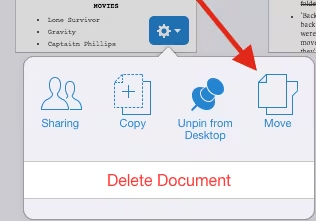
@gabylasala Yep! A long-press on the document thumbnail in iOS will bring up the menu with the option to move the document.
-
Post not available here, view on X
QuipSupport
@QuipSupport
@gabylasala Apologies for misunderstanding. Please email support@quip.com and we'd be happy to help!
QuipSupport
@QuipSupport
@gabylasala To move a spreadsheet into a folder, right click the document thumbnail and select move. Can't move from within document.
-
Post not available here, view on X
QuipSupport
@QuipSupport
@gabylasala When in folder, select the new document icon then select the spreadsheet option.
-
Post not available here, view on X
QuipSupport
@QuipSupport
@gabylasala You can use the "share" menu to add a folder or drag and drop the file from your desktop. Not working?
-
Post not available here, view on X
QuipSupport
@QuipSupport
@aaronpaulsmith On the way! 🔜🎉
-
Post not available here, view on X
QuipSupport
@QuipSupport
@aaronpaulsmith Thanks for the feedback! Something we're working on for sure! 🔩🔨✨
-
Post not available here, view on X
QuipSupport
@QuipSupport
@ChrisDaether Thanks for the bug report! Should be fixed in next update!
-
Post not available here, view on X
QuipSupport
@QuipSupport
@aaronford Assuming you're referencing missing keyboard shortcuts, they're on the way! 🎹🔜👍
-
Post not available here, view on X
QuipSupport
@QuipSupport
@IlMillantatore You can do this via Ctrl-C/Ctrl-V keyboard shortcuts for copy and paste on Quip Mac/PC/Web! Hope this helps!
-
Post not available here, view on X
QuipSupport
@QuipSupport
@EvolGenomology Thanks for the report! We're looking into it. If possible, please email support@quip.com with link to doc in question. 🚑🚨✨
-
Post not available here, view on X
QuipSupport
@QuipSupport
@cbee Please reach out to support@quip.com and we would be happy to help look into this! 🚑🚨👀
-
Post not available here, view on X
QuipSupport
@QuipSupport
@cbee It's on our list! 📋🔜🎉
-
Post not available here, view on X
QuipSupport
@QuipSupport
@EvolGenomology Diffs show you the edits made in a document. You can revert to a previous doc version on web, but no accept/reject.
-
Post not available here, view on X
QuipSupport
@QuipSupport
@ChrisDaether Thanks for the link! We haven't had a chance to read through the documentation, but it looks intriguing!
-
Post not available here, view on X
QuipSupport
@QuipSupport
@mikeaizatsky Thanks! Dispatching 🚑🚨🚒. We'll get this sorted out ASAP!
-
Post not available here, view on X
QuipSupport
@QuipSupport
@mikeaizatsky Hi Mike, can you please send a link to the folder in question & to support@quip.com to help debug? Thanks in advance!
-
Post not available here, view on X
QuipSupport
@QuipSupport
@eddgx It's not possible to import as a standalone doc, but you can attach a PDF to a doc or chat. Hope this helps!👍 support.quip.com/entries/76565545-Can-I-attach-upload-or-…
-
Post not available here, view on X
QuipSupport
@QuipSupport
@cbee Totally! It's on our list! 📋🔤👍
-
Post not available here, view on X
QuipSupport
@QuipSupport
@kitkat_katie1 Thanks for the Q! Best way to revert is via web (quip.com). Hope to get this added to mobile devices soon! 🔜📱👌
-
Post not available here, view on X
QuipSupport
@QuipSupport
@ChrisDaether We'd love to hear more about your business! Please drop us a line at support@quip.com.
-
Post not available here, view on X
QuipSupport
@QuipSupport
@wetzelsjoh We're bummed to hear this & would love to keep your team on Quip! Very interested in details on the decision - feedback@quip.com
-
Post not available here, view on X
QuipSupport
@QuipSupport
@cbee Yep, that would be great! Something we would love to add! 👍
-
Post not available here, view on X
QuipSupport
@QuipSupport
@NoahIntaraZim Correct. No way to archive the highlight without also archiving the highlight comments. Added to the list! 👍
-
Post not available here, view on X
QuipSupport
@QuipSupport
@NoahIntaraZim Not currently possible to archive a highlight and keep highlight comments. Love the feedback, though!
QuipSupport
@QuipSupport
@NoahIntaraZim To add a comment without highlighting, place the cursor on the line but don't select text when adding the comment.
-
Post not available here, view on X
QuipSupport
@QuipSupport
@NoahIntaraZim You can find the archive option in the upper left of the menu when the highlight is selected.
-
Post not available here, view on X
QuipSupport
@QuipSupport
@manfredell Thanks for the feedback! It's on our list! 👍
-
Post not available here, view on X
QuipSupport
@QuipSupport
@manfredell Our apologies! We're working on getting them added. Stay tuned!
-
Post not available here, view on X
QuipSupport
@QuipSupport
@dariru3 Thanks for the bug report! Known issue that will require an update to the App, which is on its way. Stay tuned!
-
Post not available here, view on X
QuipSupport
@QuipSupport
@dariru3 Does hiding the document thread on the left help? Would love to hear more about what you want in prez mode at support@quip.com!
-
Post not available here, view on X
QuipSupport
@QuipSupport
@KakapoIndustry Got it. This does not currently exist. We'd love to hear more about what you're looking for at support@quip.com
-
Post not available here, view on X
QuipSupport
@QuipSupport
@KakapoIndustry Are you looking for a native Mac app?
-
Post not available here, view on X
QuipSupport
@QuipSupport
@TBBJAshley If we're rock, you're paper! Glad we could help!
-
Post not available here, view on X
QuipSupport
@QuipSupport
@TBBJAshley Uh oh! Please email support@quip.com from address linked to your account and we'll take a look!
-
Post not available here, view on X
QuipSupport
@QuipSupport
@cbee Thanks for the love and feedback! We're working on it!
-
Post not available here, view on X
QuipSupport
@QuipSupport
@StacieJTM Sorry it is hard to find! The insert icon is located right above the keyboard on iOS.
-
Post not available here, view on X
QuipSupport
@QuipSupport
@haohmobile Currently we support export to markdown. No timeline for editing in markdown, but it is on our list!
-
Post not available here, view on X
QuipSupport
@QuipSupport
@kbloomq1 Great idea! Added to our list!
-
Post not available here, view on X
QuipSupport
@QuipSupport
@wetzelsjoh you can attach .pdf files in the the chat pane of a doc or standalone chat. Additional .pdf support is on our list!
-
Post not available here, view on X
QuipSupport
@QuipSupport
@wetzelsjoh Thanks for the love! We'd love to hear about issues with the support portal at support@quip.com to get them fixed!
-
Post not available here, view on X
QuipSupport
@QuipSupport
@dariru3 Yep, known issue. This will be fixed in an upcoming release.
-
Post not available here, view on X
QuipSupport
@QuipSupport
@cbee You can find the parent folder listed under the share dialogue of a folder or document. Sorry it is so hard to find!
-
Post not available here, view on X
QuipSupport
@QuipSupport
@swtzfx We should support attaching all standard image types. If you're having issues plz email support@quip.com and we'll get you sorted!
-
Post not available here, view on X
QuipSupport
@QuipSupport
@causticwithsoda Read-only link available under sharing settings. We would love to hear about what you're looking for at support@quip.com.
-
Post not available here, view on X
QuipSupport
@QuipSupport
@causticwithsoda No way to currently make this easier to see. Something we're always trying to improve - thanks for the feedback!
-
QuipSupport
@QuipSupport
@DanielCBerman Yep! Select the gear icon, then move on web. Long press then move on mobile. Hope this helps!
-
QuipSupport reposted
Salesforce Quip
@SalesforceQuip
Quip Spreadsheets is out today! Mix and match spreadsheets with text, lists, and images. -quip.com/blog/spreadsheets
-
Post not available here, view on X
QuipSupport
@QuipSupport
@justincyork Thanks for the feedback!
-
Post not available here, view on X
QuipSupport
@QuipSupport
@dariru3 So sorry! We believe a re-install of the app in iOS8 will fix this. Please email support@quip.com if you experience issues after.
QuipSupport
@QuipSupport
@dariru3 That doesn't sound good! If you could email a description of the issues to support@quip.com we would love to hear about the bugs.
-
Post not available here, view on XPost not available here, view on X
QuipSupport
@QuipSupport
Hi @fatimarizwan Does this persist on quip.com?
-
Post not available here, view on X
QuipSupport
@QuipSupport
Thanks for the report @royr. We're working on it!
-
Post not available here, view on X
QuipSupport
@QuipSupport
Hey @tricerapops - you can reset your password via the following link: quip.com/account/reset-password
-
Post not available here, view on X
QuipSupport
@QuipSupport
@SBTC_CM On web, you can drag attachment onto Quip from your email client to import. On mobile, select "Open in Quip" to import.
-
QuipSupport reposted
Business Insider
@BusinessInsider
The former Facebook CTO is building a brilliant office culture that every startup should follow read.bi/1qgGrBc
-
Post not available here, view on X
QuipSupport
@QuipSupport
@ben84jones Not for Mac - Only web, iOS, & Android currently. It is something we're thinking a lot about, though. Thanks for using Quip!
-
Post not available here, view on X
QuipSupport
@QuipSupport
@jkorr Yep, on its way. Stay tuned!
-
Post not available here, view on X
QuipSupport
@QuipSupport
@visitablog You can select the gear icon on the document and select move, then choose the new folder via sidebar. (or long-press on mobile)
-
QuipSupport reposted
Salesforce Quip
@SalesforceQuip
With @Quip, you can work on any device. Well, most devices (just look at our test phone and tablet rack)
-
QuipSupport reposted
Salesforce Quip
@SalesforceQuip
Quip 2.1 is out today! Slick new chat interface and tons of new import/export options (including @BoxHQ). quip.com/blog/chat-import-export
-
QuipSupport reposted
Salesforce Quip
@SalesforceQuip
Did you know that you can search for incomplete tasks in @quip? Type "@me is:unchecked" in the search bar! #protip x.com/quip/status/492441308066480129/photo/1
-
QuipSupport reposted
Salesforce Quip
@SalesforceQuip
Learn how one Quip customer, @AverageJoesEnt, used @Quip to cut back on internal team email by 90%: quip.com/HQhQAIkwxbuQ
-
QuipSupport reposted
Salesforce Quip
@SalesforceQuip
“@quip has virtually killed internal team email. You don't realize how important this is until it actually happens.” quip.com/HQhQAIkwxbuQ
-
QuipSupport reposted
Salesforce Quip
@SalesforceQuip
Check out @Quip and other iPad apps that make it easy to collaborate in real time! #mobile #collaboration #hashtag www.apple.com/ipad/business/apps/
-
QuipSupport reposted
Spencer Schoeben
@netspencer
Favorite startups/products right now: @quip, @AnyDO, @sosh, @sketchapp, @sunrise
-
QuipSupport reposted
-
QuipSupport reposted
Salesforce Quip
@SalesforceQuip
On this day in 1890, Wyoming became the 44th state, allowing it to collaborate with other states on @Quip (at last) x.com/quip/status/487280544627965955/photo/1
-
QuipSupport reposted
-
QuipSupport reposted
Salesforce Quip
@SalesforceQuip
Still emailing documents? Thomas Jefferson ditched the Pony Express to collaborate in @Quip. app.adjust.com/6a0vff_2gzj9v?deep_link=quip://quip.com&fa… x.com/quip/status/486924204441227264/photo/1
-
QuipSupport reposted
Quora
@Quora
"What qualities make a good startup engineer?" @quip’s @edmondlau answers: www.quora.com/What-qualities-make-a-good-startup-engineer…
-
Post not available here, view on X
QuipSupport
@QuipSupport
@ejmark3 @btaylor Hey Ethan, if you shoot support@quip.com an email we'll get you sorted.
-
QuipSupport reposted
-
QuipSupport reposted
-
Post not available here, view on X
QuipSupport
@QuipSupport
@soonOnBeatPort We are back up and running. Thanks for your patience!
-
Post not available here, view on X
QuipSupport
@QuipSupport
@mikeaizatsky Hi - you can disable email notifications separately here: support.quip.com/entries/24926442-Can-I-disable-notificat…
-
Post not available here, view on X
QuipSupport
@QuipSupport
@BaptWaels You can copy a document but not a folder yet. Similarly, you can download docs one at a time, but not all at once right now.
-
Post not available here, view on X
QuipSupport
@QuipSupport
@tomstrapps Not yet Tom. You can do it in the body of the document though
-
Post not available here, view on X
QuipSupport
@QuipSupport
@tomstrapps Hey Tom! Have you tried importing your Evernote documents into Quip? support.quip.com/entries/30077667-How-do-I-import-documen…
-
Post not available here, view on X
QuipSupport
@QuipSupport
@mikeaizatsky Thanks for reaching out - would you mind emailing us at support @ quip .com to explain? Thanks!
-
Post not available here, view on X
QuipSupport
@QuipSupport
@azzamallow Hi - have you tried searching for you docs in Quip? You should be able to search for them and convert them
-
Post not available here, view on X
QuipSupport
@QuipSupport
@cueteGeek Hi - thanks for your question. I will pass this on to our Android team and let you know!
QuipSupport
@QuipSupport
@cueteGeek Can you actually email me at support @ quip .com? I have a few more questions I want to ask. Thanks!
-
Post not available here, view on X
QuipSupport
@QuipSupport
@cbee Hi - thanks for getting in touch. Would you mind emailing us at support @ quip .com so we can ask some more questions?
-
Post not available here, view on X
QuipSupport
@QuipSupport
@wcoburn Hi - currently we don't support the Kindle Fire, but it is on our list
-
Post not available here, view on X
QuipSupport
@QuipSupport
@MrMacCorquodale Hi - I'd love to tell you more about how students and teachers are using Quip. Can you email me at josh @ quip .com? Thx
-
QuipSupport
@QuipSupport
Don't forget to nominate Quip for "Sexiest Enterprise Startup" at the Crunchies from @TechCrunch here: crunchies2013.techcrunch.com/nominated/?OTpRdWlw
-
Post not available here, view on X
QuipSupport
@QuipSupport
@curtmercadante Hi Curt! Right now the Android app is a preview version. We are working hard to get the full version out, so stay tuned!
QuipSupport
@QuipSupport
@curtmercadante Quip for Android 1.0 is now available! play.google.com/store/apps/details?id=com.quip.quip Try it out and let us know what you think!
-
Post not available here, view on X
QuipSupport
@QuipSupport
@cbee so sorry about that. Can you send the account email to support@quip.com? We will resend the verification
-
Post not available here, view on X
QuipSupport
@QuipSupport
@p_ka thanks for letting us know Gero! How are you liking Quip?
-
Post not available here, view on X
QuipSupport
@QuipSupport
@_dvcm Hi - would you mind sending us an email at support @ quip . com? I'd like to ask you some more questions. Thanks!
-
Post not available here, view on X
QuipSupport
@QuipSupport
@kellybriley Thanks for using Quip, Kelly! No plans yet - we are focused on Android now, but plan on adding integrations later. Stay tuned!
-
Post not available here, view on X
QuipSupport
@QuipSupport
@cbee Hi - You can reset your password here: quip.com/account/reset-password. Thanks!
-
Post not available here, view on X
QuipSupport
@QuipSupport
@jerrydaniels Thanks for flagging. They are both known issues and we're working on fixes so stay tuned!
-
Post not available here, view on X
QuipSupport
@QuipSupport
@geiraasen Hi! You will always be signed in with a password. Are you signing in through your google account? You may already be logged in
-
Post not available here, view on X
QuipSupport
@QuipSupport
@dusponda no problem! Parts of it work on the iphone, but the full version for iPad and iPhone are coming soon
-
Post not available here, view on X
QuipSupport
@QuipSupport
@blithemdjd Hi - how's the app working for you? Would love to hear how lawyers and law firms use the product!
-
Post not available here, view on X
QuipSupport
@QuipSupport
@dusponda thanks for trying Quip! we currently only support iOS6, but are working on the iOS7 product, so stay tuned!
-
Post not available here, view on X
QuipSupport
@QuipSupport
@starbellyphoto hi starbelly team! we would love to hear how you are using Quip. Can you send me an email at josh@quip.com?
-
Post not available here, view on X
QuipSupport
@QuipSupport
@pfeiferaz @quip If the thread is still there, you can undo it yourself. In the thread, it should say "Michael deleted the document -- Undo"
QuipSupport
@QuipSupport
@pfeiferaz @quip If the thread is gone too, the find the document URL in an email notification and send it to support@quip.
-
QuipSupport
@QuipSupport
Hi @hondanhon - thanks for checking out Quip! Have you tried creating a doc/folder and inviting users via email/text? support.quip.com/entries/25041707-How-do-I-invite-someone…
-
Post not available here, view on X
QuipSupport
@QuipSupport
@cbee @quip Yup! The gear on the top left corner of your Quip Desktop has a button in the dropdown that says "Email Preferences"
-
Post not available here, view on X
QuipSupport
@QuipSupport
@endaguinan @quip You can sign up with any email address. If you have gmail, we try to make set up easier for you by using gmail's auth
-
Post not available here, view on X
QuipSupport
@QuipSupport
@nickbertolino @quip We don't support that right now but until we do, try this! code.markbao.com/quipfocus/